Freelancers
Build calculators for clients.
Create branded calculators visually, configure formulas without coding, and export production-ready files.
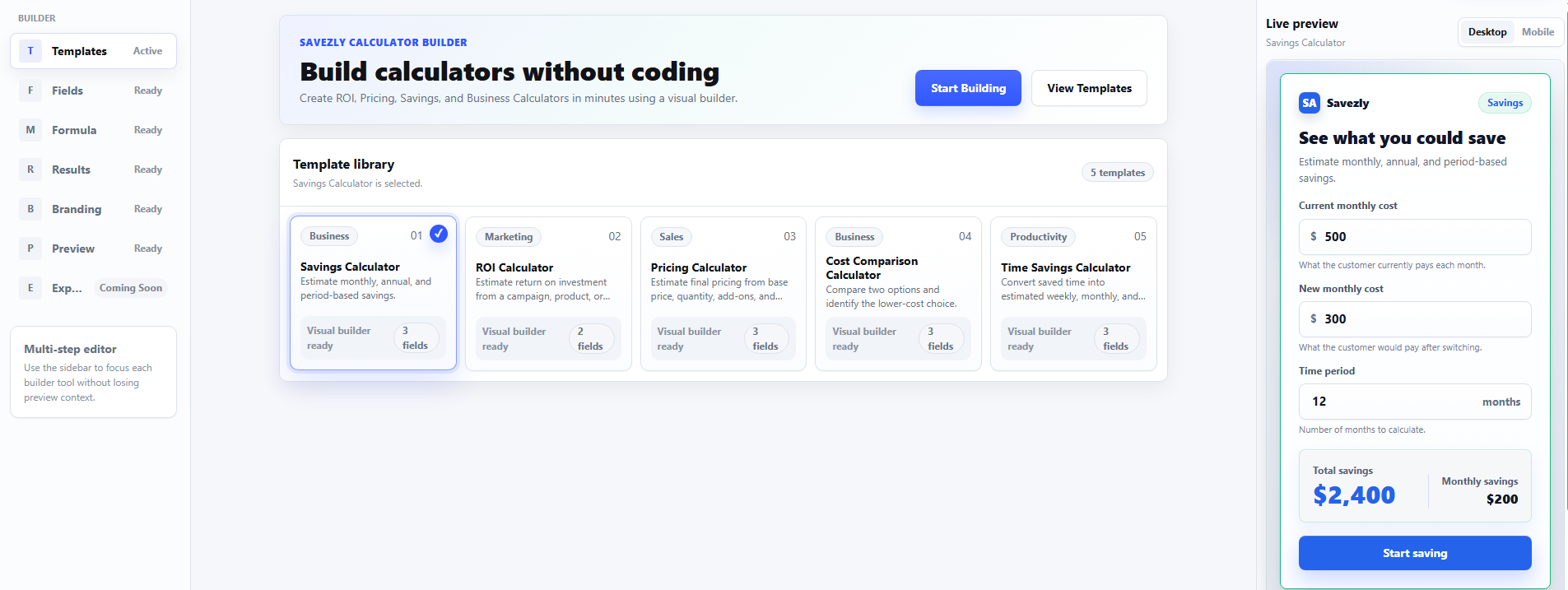
Build calculators for clients.
Deliver lead generation tools.
Create conversion-focused calculators.
Publish ROI and pricing calculators.
Embed calculators into websites.
Build without programming.
Savezly keeps the workflow visual, portable, and simple to ship.
Configure calculator structure without writing code.
Map inputs to calculation variables with a focused editor.
Inspect the calculator as fields, results, and branding change.
Customize name, logo text, colors, and radius.
Back up, share, and restore editable project source files.
Generate a ready-to-publish static calculator package.
Everything runs with vanilla HTML, CSS, and JavaScript.
Start with a commercial calculator structure.
Adjust inputs, labels, colors, and presentation.
Export a clean ZIP package with static files.
Upload the files to a website, client project, or static host.
Estimate future savings.
Measure return on investment.
Create fast pricing estimates.
Compare two purchase paths.
Turn saved hours into value.
Two clear export paths give buyers flexibility for backups, client work, and publishing.
Use JSON export to save a draft, transfer a project, or return later for future editing.
Use ZIP export to deliver static HTML, CSS, JavaScript, and README files.
Yes. Generated calculators are static files and can be uploaded to most websites or static hosting platforms.
No. Generated calculators run in the browser using static HTML, CSS, and JavaScript.
Yes. The exported files are plain HTML, CSS, and JavaScript, so they can be customized manually.
Generated calculators can be packaged for client projects or productized workflows according to the license included with your purchase.
Yes. You can upload or embed the generated static files depending on your WordPress setup and hosting permissions.
Yes. The builder is static and can run locally in a modern browser.
No server storage is used. Drafts are saved locally in the browser when local storage is available.
Yes. Use Import JSON to restore an editable project source file created by the builder.
Yes. The Branding section supports brand name, logo text, colors, and radius settings.
Yes. The builder is designed for visual configuration. Code editing is optional after export.
Download Savezly Calculator Builder today.